
Tutorial For Hub Club Members on Processing Downloaded Products.
I was going to write a Blog Post on this, but then I thought, make a static page as a tutorial about processing Downloaded Products, so here it is. This isn’t about building funnels or email marketing, it’s simply about turning one of our downloads into a product you can promote yourself.

We uploaded this set of MRR products the other day, so at the time of writing this, March 7 2026, it’s a fresh new product. But what do you do with it?
The first thing I always do is read it. How else would I know if it’s worth adding to The Hub. This not only allows you to check the product, but in doing so, you’re also gaining great information. You won’t believe how many products that appear to be great, turn out to be utter garbage. We had one product last year which appeared to be a perfect video tutorial for this site. When I watched it, he was teaching methods that were basically scamming people, so it didn’t appear here.
OK, so you decide it’s a product you want to promote, through whatever channel or system you use.
What’s Inside the Downloaded Product.
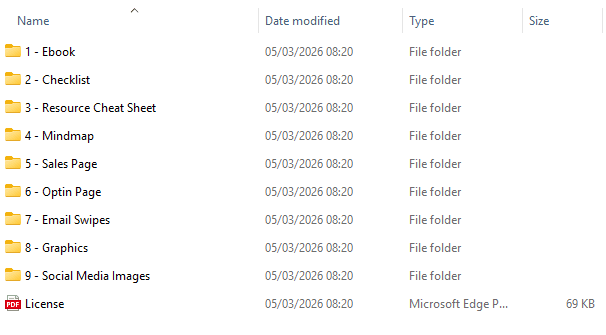
So after downloading the product and storing to somewhere you can find later, unzip the compressed file. Working in the unzipped folder, you will see something like this. It shows what is included in the download. This is not the folder you offer you customers, it’s the ingredients for your final product.
The first 4 folders are what you offer your customer. Remember, these come with MRR, so you cannot change anything in these. Folders 5 – 9 are your tools to promote and sell the product and lastly, but most importantly, the Licence. So, let’s have a look at the licence.
The Downloaded Product Licence
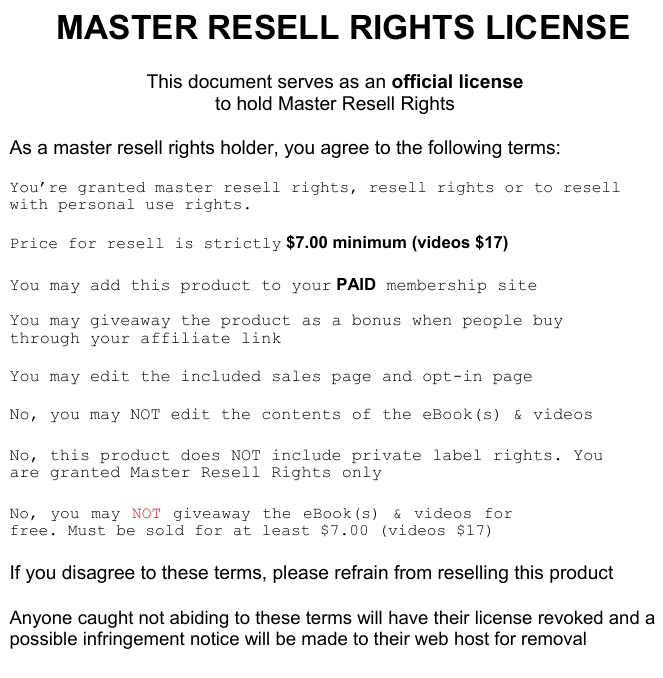
So, what does this licence mean. The product comes with Master Resell Rights. This means you can sell it as a stand alone product or sell it with Master Resell Rights, therefore allowing your customer to have a MRR licence as well.
It states you can edit the sales and opt-in pages, which is what we are going to do, but you cannot edit the contents of the eBook or videos. It also states that it must be sold for $7 minimum, cannot be given away, unless it’s used as a bonus. But the important thing here is that the sales copy can be altered.
How To Edit The Sales Copy
This part very much depends on how you build your sales funnel, do you do it all in something like System.io or Stan Store, or do you use maybe Aweber or Mail Chimp, personally I prefer Aweber. Within System.io and Stan, you can build your own sales funnel pages, so at this point, the rest of this page is of no use to you. But, with Aweber, I like to point the funnel to my own site and use edited version of the original sales copy, why re-invent the wheel?
Click on this link and view the original sales copy. It’s a demo with no actionable links. CLICK HERE
This is the raw version that comes with the product. A simple straight forward sales page. But it’s useless to me, I need to personalise it for my funnel. The program I use to edit modern sales copy is “Blue Griffon”. Although no longer being updated, it is still fully functioning and available for Windows, Mac and Linux from here. You can completely edit the copy and make it yours, and unlike the old favourite editors like NVU or Kompozer, it works with modern HTML and CSS, so the page formats stay intact.
What I do is create a working copy of the download files, edit them in Blue Griffon and save the sales index page to the working copy. I add anything I want, including a download and payment link to perhaps Aweber, or even in some cases my Beacons store, and that takes care of the payment and delivery side. I then upload the index page, image and CSS folders to my public_html via my cPanel giving me a working, edited page on my site.
Here is a very simple edited version, again, no working links, this is demo only. CLICK HERE
Conclusion.
To be honest, this is just a starter article about how to promote the products, but I struggle for weeks trying to find a simple way to do this, so if it’s helped, great.